How Java Regex Transforms Text Processing: Power, Precision, and Pitfalls

Java regex isn’t just another library feature—it’s a precision instrument for developers who demand control over text. Whether you’re parsing logs, validating user input, or extracting structured data from unruly strings, the Java regex engine delivers efficiency with a syntax that balances readability and power. The moment you replace brute-force string operations with a single Pattern and Matcher call, you’re not just writing code; you’re engineering solutions that scale.
Yet for all its utility, regex in Java remains one of those tools developers either love or fear—its cryptic metacharacters can feel like solving a puzzle without a map. The good news? Mastery isn’t about memorization. It’s about understanding the Java regex engine’s core logic: how it compiles patterns, how backtracking works, and why certain constructs (like greedy quantifiers) can turn elegant code into performance nightmares. The difference between a maintainable regex and a maintenance hazard often hinges on these mechanics.
This deep dive cuts through the noise. We’ll dissect how Java regex evolved from Perl’s influence to its current role in modern Java, expose the hidden costs of poorly written patterns, and compare it to alternatives like String.split() or third-party libraries. By the end, you’ll know not just how to use regex in Java, but when to wield it—and when to walk away.
The Complete Overview of Java Regex
The Java regex framework, introduced in Java 1.4 as part of the java.util.regex package, is a direct implementation of Perl-compatible regular expressions (PCRE). Unlike ad-hoc string methods, it provides a unified way to describe text patterns using a formal grammar, then execute those patterns against input strings. At its heart, regex in Java operates in three phases: pattern compilation, matching, and replacement. The Pattern class compiles a regex into a finite automaton (a state machine), while the Matcher class applies that automaton to input text, tracking matches, groups, and offsets. This separation allows for reuse of compiled patterns—a critical optimization for high-performance applications.
What sets Java regex apart is its integration with Java’s type system. Methods like String.matches() or Pattern.matcher() return objects that can be chained or iterated, enabling fluent APIs. For example, extracting all email addresses from a document might look like this:
Pattern.compile("\\b[A-Za-z0-9._%+-]+@[A-Za-z0-9.-]+\\.[A-Za-z]{2,}\\b").matcher(text)
.results()
.map(m -> m.group())
.collect(Collectors.toList());
Here, the regex isn’t just a static string—it’s part of a pipeline that transforms raw text into structured data. This level of integration is why regex in Java isn’t confined to parsing; it’s a building block for data processing pipelines, validation frameworks, and even domain-specific languages.
Table of Contents
- The Complete Overview of Java Regex
- Historical Background and Evolution
- Core Mechanisms: How It Works
- Key Benefits and Crucial Impact
- Major Advantages
- Comparative Analysis
- Future Trends and Innovations
- Conclusion
- Comprehensive FAQs
- Q: How does Java regex handle Unicode characters?
- Q: Why does my Java regex match differently in different environments?
- Q: Can Java regex be used for XML/HTML parsing?
- Q: How do I optimize a slow Java regex?
- Q: What’s the difference between Matcher.find() and Matcher.matches() ?
- Q: Are there security risks with Java regex?
Historical Background and Evolution
The roots of Java regex trace back to Perl, whose creator, Larry Wall, designed regex as a way to handle text manipulation in a single, expressive syntax. When Java adopted PCRE in 1999, it inherited this philosophy: prioritize flexibility over strictness. Early versions of regex in Java were criticized for performance—compared to Perl’s regex engine, Java’s was slower due to its JVM overhead. However, optimizations in later Java versions (particularly with Pattern caching and NIO buffers) narrowed the gap. Today, Java regex is used in everything from Apache’s logging utilities to financial systems parsing transaction records.
One often-overlooked evolution is the introduction of java.util.regex.Matcher’s appendReplacement() and appendTail() methods in Java 1.5, which enabled in-place string rewriting without temporary buffers. This was a game-changer for large-scale text transformations, reducing memory churn. More recently, Java 9’s Pattern.compile() overloads for CharSequence and the addition of Matcher.region() for bounded matching further refined the toolkit. The lesson? Regex in Java isn’t static—it adapts to the needs of modern applications, from microservices to big data processing.
Core Mechanisms: How It Works
Under the hood, a Java regex pattern is parsed into a network of states and transitions, similar to a deterministic finite automaton (DFA). For example, the pattern ab compiles to a DFA with three states: one for zero or more ‘a’s, one for the mandatory ‘b’, and a final accepting state. When the Matcher processes input, it follows these transitions, backtracking only when necessary (e.g., if a fails to match after consuming too many ‘a’s). This backtracking is where performance pitfalls lurk—nested quantifiers ((a+)+) can lead to catastrophic backtracking, where the engine spends more time undoing matches than making progress.
The Matcher class’s methods—find(), matches(), lookingAt()—are designed to handle different matching scenarios. find() scans the entire input for non-overlapping matches, while matches() requires the entire string to conform to the pattern. The group() and group(int) methods extract captured substrings, which are defined by parentheses in the pattern. For instance, in (\d{3})-(\d{4}), group(1) returns the area code. This group-based extraction is why regex in Java is indispensable for structured data parsing, such as CSV or JSON fields.
Key Benefits and Crucial Impact
Developers turn to Java regex for three reasons: precision, conciseness, and reusability. Precision comes from the ability to define complex rules in a single expression—validating an IP address or extracting timestamps without writing loops. Conciseness is evident when comparing a 20-line if-else ladder to a 50-character regex. Reusability shines in applications like log analyzers, where the same pattern might scan millions of lines. The impact extends beyond code: regex in Java reduces cognitive load by abstracting repetitive text-handling tasks into declarative patterns.
Yet the benefits aren’t without trade-offs. A poorly constructed Java regex can become a maintenance nightmare—imagine debugging (?:(?:a|b)*c)+ in production. The key is balancing expressiveness with simplicity. Tools like Pattern.quote() (which escapes special characters) and regex testers (e.g., Regex101) mitigate risks by making patterns more predictable.
"Regex is a language unto itself, and like any language, its power comes from discipline. The best Java regex patterns are those that read like prose—clear, intentional, and free of unnecessary complexity."
— G. V. Regexxer, Author of Mastering Java Text Processing
Major Advantages
- Unified Syntax for Complex Rules: A single Java regex can replace multiple conditional checks. For example, validating a password with mixed case, numbers, and symbols requires one pattern instead of separate
String.contains()calls. - Performance Optimizations: Compiled patterns avoid repeated parsing. Caching
Patternobjects (e.g., as static finals) is a common optimization in high-throughput systems. - Integration with Java Streams:
Matcher.results()(Java 9+) enables regex operations to fit into functional pipelines, e.g., extracting all URLs from a document and processing them in parallel. - Lookaheads/Lookbehinds for Contextual Matching: Patterns like
(?=\d{3}-)\d{4}match only if preceded by a hyphen, enabling complex validations without post-processing. - Backward Compatibility: Regex in Java supports legacy patterns from Java 1.4, ensuring long-lived codebases remain functional.
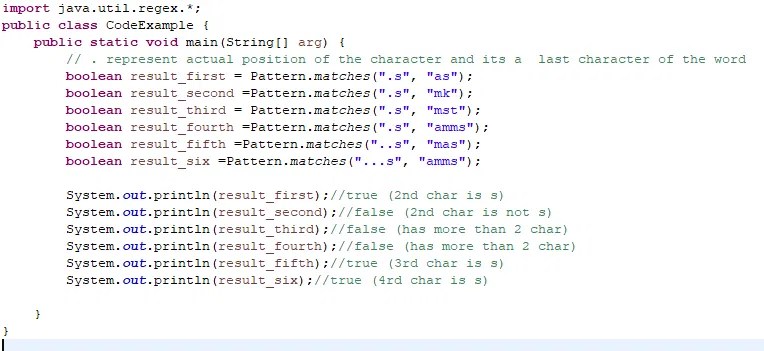
Comparative Analysis
| Feature | Java Regex | Alternative Approaches |
|---|---|---|
| Syntax Complexity | High (metacharacters, groups, quantifiers) | String.split(): Low (but limited to fixed delimiters)StringTokenizer: Moderate (token-based, no patterns) |
| Performance | Optimized for compiled patterns (DFA/NFA hybrid) | String.replaceAll(): Slower (recompiles per call)Third-party (e.g., com.google.re2j): Faster but heavier |
| Readability | Poor for novices; improves with experience | String.contains() chains: Verbose but explicitDSLs (e.g., java.text.ParsePosition): Domain-specific clarity |
| Use Case Fit | Ideal for: Validation, extraction, transformation | Scanner class: Better for tokenizationJSON/XML parsers: Better for structured data |
Future Trends and Innovations
The next frontier for Java regex lies in integration with machine learning and probabilistic parsing. Tools like java.text.Normalizer (for Unicode normalization) are already paving the way, but future versions may incorporate regex-based NLP preprocessing. For example, a regex could pre-filter text before feeding it into a transformer model, reducing tokenization overhead. Meanwhile, projects like JEP 406 (Vector API) hint at hardware-accelerated regex operations, which could make regex in Java even faster for large datasets.
Another trend is the rise of "regex-like" DSLs in Java, such as java.util.pattern extensions or libraries like com.github.wnameless.json’s path expressions. These blur the line between regex and structured queries, offering a middle ground for developers who need more control than regex provides but less boilerplate than writing a parser from scratch. As Java evolves, regex in Java will likely remain a cornerstone—but its role may shift from standalone text processing to a component in larger data workflows.

Conclusion
Java regex is neither a silver bullet nor a relic—it’s a precision tool for developers who understand its strengths and limitations. When used correctly, it transforms messy text into structured data with minimal code. When misapplied, it becomes a source of bugs and performance bottlenecks. The key is treating regex in Java as part of a broader toolkit: pair it with validation libraries for user input, use String methods for simple splits, and reserve complex patterns for scenarios where no alternative exists.
As Java continues to evolve, so will the ways we leverage regex in Java. The patterns you write today may one day be optimized by JIT compilers or augmented with AI-driven suggestions. But the core principle remains: regex in Java is about intentionality. Every metacharacter, every group, and every quantifier should serve a purpose. Write with that discipline, and you’ll unlock its full potential.
Comprehensive FAQs
Q: How does Java regex handle Unicode characters?
A: Java’s regex in Java supports Unicode via the \p{} property escapes (e.g., \p{IsLetter} matches any Unicode letter) and the \uXXXX escape sequence. For full Unicode support, use the (?U) inline modifier or enable it globally with Pattern.compile("(?U)..."). However, some advanced Unicode features (like grapheme clusters) require Java 9+ and careful pattern design.
Q: Why does my Java regex match differently in different environments?
A: Regex in Java behavior can vary due to:
- Locale Settings: Methods like
Pattern.compile()withLocaleaffect case-insensitive matching (e.g.,Pattern.CASE_INSENSITIVEvs.Locale.ENGLISH). - Java Version: Java 9+ introduced
Matcher.region()and improved Unicode handling. Older versions may have quirks with certain patterns. - Input Encoding: If the input isn’t UTF-8, surrogate pairs (e.g., emojis) may break. Always normalize text with
Normalizer.normalize()before matching.
Matcher.find() and log group() results.
Q: Can Java regex be used for XML/HTML parsing?
A: While regex in Java can extract simple elements (e.g., <title>(.*)</title>), it’s not recommended for full XML/HTML parsing due to:
- Nested structures (e.g.,
<div><span>text</span></div>) break regex’s linear matching. - Malformed markup (e.g., unclosed tags) confuses the engine.
- Performance: Regex backtracking is slower than SAX/DOM parsers for large documents.
javax.xml.parsers or libraries like Jsoup instead.
Q: How do I optimize a slow Java regex?
A: If your regex in Java is slow, try these steps:
- Precompile Patterns: Cache
Patternobjects asstatic final. - Avoid Catastrophic Backtracking: Replace nested quantifiers (e.g.,
(a+)+) with atomic groups ((?>a+)) or possessive quantifiers (a++). - Use Non-Capturing Groups:
(?:)instead of( )reduces overhead. - Limit Lookaheads: Each
(?=...)increases the state space. - Profile with RegexPlan: Tools like RegexPlan visualize the automaton and identify bottlenecks.
String methods or a state machine.
Q: What’s the difference between Matcher.find() and Matcher.matches()?
A: Both methods use regex in Java, but their behavior differs critically:
find(): Scans the input for any match, returningtrueif found. Subsequent calls continue searching from the last match’s end. Example: Extracting all dates in a log file.matches(): Requires the entire input string to match the pattern. Returnsfalseif the string is longer or shorter than the pattern allows. Example: Validating a single password.
find() for partial matches and matches() for whole-string validation.
Q: Are there security risks with Java regex?
A: Yes. Regex in Java can be exploited in:
- ReDoS (Regular Expression Denial of Service): Malicious input (e.g.,
a{100000}) forces catastrophic backtracking, crashing the JVM. Mitigate by:- Using timeouts (e.g.,
Matcher.useTransparentBounds(true)in Java 9+). - Limiting quantifier ranges (e.g.,
{1,10}instead of*). - Validating input length before matching.
- Using timeouts (e.g.,
- Information Leakage: Regex can inadvertently expose sensitive data (e.g.,
.password.in logs). Always sanitize patterns and logs. - Code Injection: If user input directly constructs regex (e.g.,
Pattern.compile(userInput)), attackers can bypass validation. UsePattern.quote()or whitelist-safe characters.
Leave a Comment
Comments are moderated before appearing. The data you submit is processed according to the Privacy Policy of Surfchex.