How Python Map Transforms Data Processing and Code Efficiency
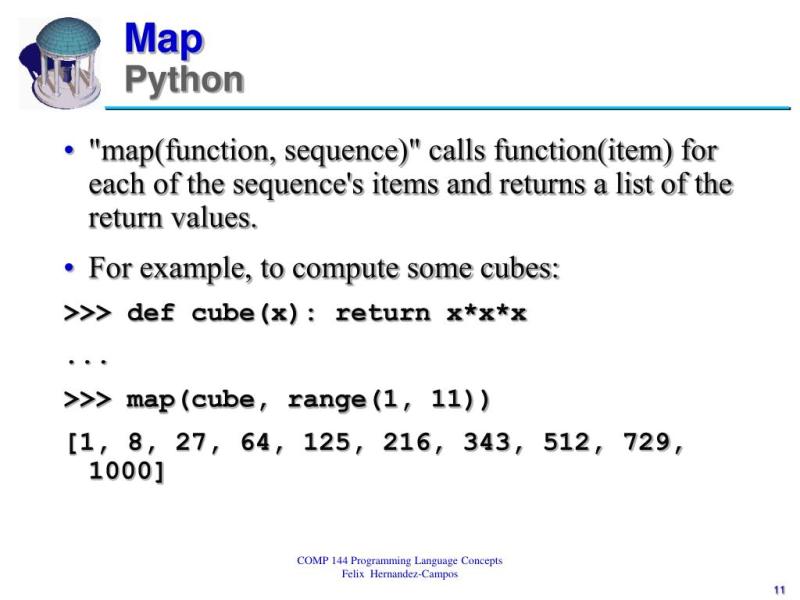
Python’s `map()` function is a silent powerhouse—an elegant, built-in tool that processes sequences with minimal boilerplate while maintaining clarity. Unlike brute-force loops, it leverages functional programming principles to apply operations across iterables, reducing cognitive overhead for developers. Its versatility spans from simple data cleaning to complex parallel computations, yet many overlook its subtleties, opting instead for list comprehensions or manual iteration. The irony? `map()` often outperforms these alternatives in both speed and readability when used correctly.
What makes `map()` particularly intriguing is its dual nature: it’s both a functional construct and a performance optimization. Under the hood, it delegates work to C-level implementations in Python’s interpreter, making it faster than Pythonic loops in many cases. Yet its true value lies in abstraction—allowing developers to focus on what to transform rather than how to iterate. This balance between efficiency and expressiveness is why `map()` persists as a staple in Python’s toolkit, decades after its inception.
The function’s design reflects Python’s philosophy of simplicity and pragmatism. While languages like Haskell or Lisp treat `map()` as a first-class citizen, Python’s implementation is pragmatic: it bridges the gap between functional elegance and imperative practicality. Whether you’re wrangling datasets, preprocessing machine learning inputs, or optimizing legacy code, understanding `map()` unlocks a layer of Pythonic efficiency most developers never explore.
The Complete Overview of Python Map
Python’s `map()` function is a higher-order function that applies a specified operation to every item in an iterable (like a list, tuple, or generator) and returns an iterator of results. At its core, it’s a lazy evaluator—meaning it doesn’t compute values until explicitly requested—making it memory-efficient for large datasets. This contrasts with list comprehensions, which eagerly create new lists in memory. The function’s signature is straightforward:```python
map(function, iterable, ...)
```
Here, `function` is any callable (lambda, named function, or even a method), and `iterables` can be multiple, enabling element-wise operations across sequences.
The beauty of `map()` lies in its adaptability. It can handle unary operations (e.g., squaring numbers) or binary operations (e.g., element-wise addition of two lists), provided the iterables are of compatible lengths. For example:
```python
Unary map: Square each element
numbers = [1, 2, 3]squared = map(lambda x: x2, numbers) # Returns a map object
# Binary map: Add corresponding elements
list(map(lambda x, y: x + y, [1, 2], [3, 4])) # Output: [4, 6]
```
This flexibility extends to custom objects, where `map()` can transform attributes or apply methods uniformly across collections.
Historical Background and Evolution
The concept of `map()` traces back to Lisp in the 1950s, where it was introduced as a way to abstract iteration over sequences. Python borrowed this idea from functional languages like Scheme and ML, embedding it in its standard library as part of its functional programming toolkit. Guido van Rossum, Python’s creator, included `map()` in Python 1.0 (1991) to provide a concise alternative to manual loops, aligning with the language’s emphasis on readability.Table of Contents
- The Complete Overview of Python Map
- Unary map: Square each element
- Historical Background and Evolution
- Core Mechanisms: How It Works
- Key Benefits and Crucial Impact
- Major Advantages
- Comparative Analysis
- Future Trends and Innovations
- Conclusion
- Comprehensive FAQs
- Q: Can `map()` handle multiple iterables?
- Q: Why does `map()` return an iterator in Python 3?
- Q: Is `map()` slower than list comprehensions for small lists?
- Q: Can `map()` be used with custom objects?
- Q: How does `map()` handle errors during iteration?
- Q: What’s the difference between `map()` and `numpy.vectorize()`?
- Q: Can `map()` be used with generators?
Over time, `map()` evolved alongside Python’s growth. Early versions returned lists directly, but Python 3 transitioned it to return iterators, improving memory efficiency. This change reflected broader trends in Python’s design—prioritizing lazy evaluation and generator-like behavior to handle large datasets without excessive memory consumption. The shift also mirrored the rise of functional programming paradigms in mainstream languages, where `map()` became a cornerstone for declarative data processing.
Core Mechanisms: How It Works
Under the hood, `map()` is implemented as a C extension in Python’s interpreter, which explains its performance edge over pure Python loops. When called, it creates an iterator that yields results one at a time, only computing values when iterated over (e.g., via `next()` or `list()`). This lazy evaluation is critical for performance, especially with large or infinite iterables like file streams or generator expressions.The function’s mechanics are deceptively simple:
1.
2. Application: For each element, it invokes the provided callable with the corresponding arguments.
3. Yielding: Results are produced on-demand, avoiding upfront memory allocation.
For instance, `map()` can process a generator without loading the entire sequence into memory:
```python
def infinite_sequence():
i = 0
while True:
yield i
i += 1
# Process first 10 squares lazily
squares = map(lambda x: x
print(list(next(squares) for _ in range(10))) # Output: [0, 1, 4, 9, 16, 25, 36, 49, 64, 81]
```
This behavior makes `map()` ideal for streaming data or pipelines where intermediate results are consumed immediately.
Key Benefits and Crucial Impact
Python’s `map()` function is more than syntactic sugar—it’s a performance and expressiveness multiplier. By abstracting iteration logic, it reduces boilerplate code, making transformations concise and maintainable. Developers often reach for list comprehensions by default, but `map()` can be more efficient, especially when combined with built-in functions or lambda expressions. Its lazy evaluation also aligns with modern data processing needs, where memory efficiency is non-negotiable.The function’s impact extends beyond micro-optimizations. In data science, `map()` is used to preprocess inputs for machine learning models, apply feature transformations, or clean datasets without manual loops. Libraries like NumPy and Pandas internally leverage similar principles, but understanding `map()` provides a foundational grasp of how these tools operate under the hood.
> "Python’s `map()` is the functional equivalent of a Swiss Army knife—compact, versatile, and capable of handling tasks from trivial to complex with minimal fuss." — David Beazley, Python Core Developer
Major Advantages
- Performance Optimization: `map()` often outperforms list comprehensions in benchmarks due to its C-level implementation, especially for CPU-bound operations.
- Memory Efficiency: Lazy evaluation avoids loading entire datasets into memory, critical for big data or streaming applications.
- Code Clarity: Reduces nested loops and temporary variables, making transformations more readable and aligned with functional programming principles.
- Flexibility: Works with any callable (functions, lambdas, methods) and multiple iterables, enabling complex operations like element-wise matrix multiplication.
- Integration: Seamlessly pairs with other functional tools like `filter()`, `reduce()`, or generators for pipeline-style data processing.

Comparative Analysis
| Aspect | Python Map vs. List Comprehension |
|---|---|
| Performance | `map()` is faster for large datasets due to C optimizations, but list comprehensions are often faster for small lists (due to Python’s overhead in calling `map()`). |
| Memory Usage | `map()` is lazy (returns an iterator), while list comprehensions create a new list in memory. |
| Readability | List comprehensions are often more Pythonic for simple transformations, but `map()` excels with complex or multi-argument operations. |
| Use Case | `map()` shines in functional pipelines or when memory efficiency is critical; list comprehensions are better for quick, in-place transformations. |
Future Trends and Innovations
As Python continues to evolve, `map()` may see indirect enhancements through broader functional programming support. Projects like Python’s type hints and static analysis tools (e.g., `mypy`) could improve `map()`’s usability by making its return types more predictable. Additionally, the rise of just-in-time (JIT) compilation (via libraries like Numba) might further optimize `map()` operations, blurring the line between interpreted and compiled performance.Long-term, `map()` could integrate more deeply with async programming, enabling non-blocking transformations over async iterables. While Python’s `asyncio` framework already supports async generators, extending `map()` to work seamlessly with them would unlock new paradigms for concurrent data processing. The function’s future may also hinge on its adoption in emerging domains like quantum computing, where lazy evaluation and parallelism are critical.

Conclusion
Python’s `map()` function is a testament to the language’s ability to balance simplicity with power. Its historical roots in functional programming, combined with modern optimizations, make it a versatile tool for data transformation. While list comprehensions remain the go-to for many, `map()` offers unmatched efficiency and expressiveness in the right contexts—whether you’re processing gigabytes of data or refactoring legacy code.Mastering `map()` isn’t just about writing cleaner loops; it’s about understanding Python’s functional toolkit and when to leverage its strengths. As data grows in scale and complexity, the principles behind `map()`—lazy evaluation, abstraction, and performance—will only become more relevant. For developers who embrace functional patterns, `map()` is more than a utility; it’s a mindset shift toward writing code that’s both elegant and efficient.
Comprehensive FAQs
Q: Can `map()` handle multiple iterables?
Yes. `map()` accepts multiple iterables and applies the function to corresponding elements. For example, `map(lambda x, y: x + y, [1, 2], [3, 4])` adds elements pairwise. All iterables must be of equal length; otherwise, it raises a `ValueError`.
Q: Why does `map()` return an iterator in Python 3?
Python 3’s `map()` returns an iterator to improve memory efficiency. Unlike Python 2, which returned a list, the iterator yields results on-demand, making it suitable for large or infinite sequences without precomputing all values.
Q: Is `map()` slower than list comprehensions for small lists?
Yes, for small datasets, list comprehensions are often faster due to Python’s overhead in calling `map()` (which involves function dispatch). However, for large datasets or CPU-bound operations, `map()` can outperform comprehensions due to its C-level optimizations.
Q: Can `map()` be used with custom objects?
Absolutely. `map()` works with any callable, including methods of custom objects. For example, if you have a class with a `transform()` method, you can apply it to a list of instances using `map(lambda obj: obj.transform(), objects)`.
Q: How does `map()` handle errors during iteration?
If the callable passed to `map()` raises an exception (e.g., `TypeError`, `ValueError`), the iterator stops and propagates the exception when next is called. There’s no built-in error handling; you’d need to wrap the callable in a `try-except` block or use `itertools.starmap` for more control.
Q: What’s the difference between `map()` and `numpy.vectorize()`?
`numpy.vectorize()` is a wrapper around `map()` that mimics NumPy’s broadcasting rules but is slower than native NumPy operations. `map()` is more lightweight and flexible, while `vectorize()` is designed for NumPy arrays and provides element-wise operations with NumPy’s performance benefits.
Q: Can `map()` be used with generators?
Yes. `map()` is ideal for generators because it processes them lazily. For example, `map(lambda x: x**2, (x for x in range(1000000)))` won’t load all squared values into memory at once, making it memory-efficient for large or infinite sequences.
Leave a Comment
Comments are moderated before appearing. The data you submit is processed according to the Privacy Policy of Surfchex.